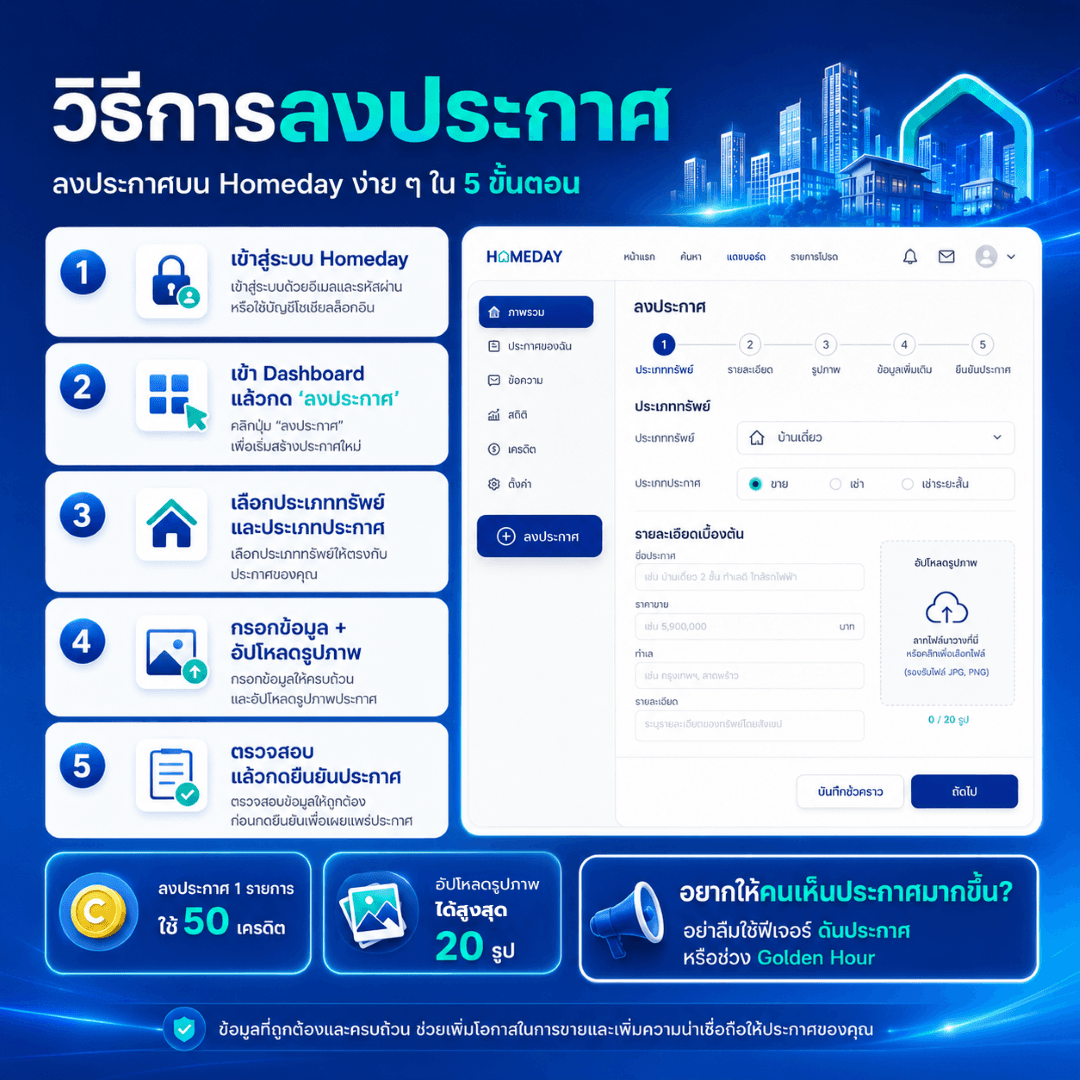
Steps to post a listing on Homeday:
Log in to Homeday
Log in with your email and password, or the social media account you registered with.
Go to Dashboard and click “Post Listing”
Navigate to the Dashboard, then select the “Post Listing” menu to start creating a new listing.
Select Property Type and Listing Type
Choose the type of real estate, such as house, condo, land, townhome, or commercial building. Then select the listing type, such as For Sale / For Rent / Short-term Rent, according to your property type.
Fill in Information and Upload Photos
Fill in all required information, such as listing title, price, location, property details, area size, number of rooms, and other additional information. Upload clear property photos; you can upload up to 20 photos.
Review and Confirm Listing
Review all information for accuracy before confirming to ensure the listing is complete, trustworthy, and helps increase the chances of seekers deciding to contact you.
Posting 1 listing uses 50 credits. If you don't have credits yet, new members can receive free credits after completing registration and identity verification according to the system's conditions.